What is the Ford frunk?
The Ford frunk is a trunk built into the front of the all-electric F-150® Lightning™ and the Mustang Mach-E®.
Note: The frunk is optional on model year 2026 and newer Mustang Mach-E vehicles.
Some features include:
- Durable, rubberized, water-resistant interior and built-in drainage holes for quick and easy clean-up.
- An adjustable opening frunk hood opening height, so it can open even if the ceilings are low.
- Lights are installed in the hood, so you can always get a clear view of your cargo.
For information specific to your vehicle's frunk, refer to the following table or your Owner's Manual.
| 2024 and Earlier Model Year F-150 Lightning | 2024 and Earlier Model Year Mustang Mach-E | 2025 and newer Model Year Mustang Mach-E |
|
|
|
Using the Frunk
Choose a drop-down option below to learn about how to open, close, and use the Ford frunk.
Opening the Frunk
Refer to the table below for different methods of opening your frunk.
| Opening Method | Example | ||
Press the frunk control button on your vehicle. Note: This method is only available for the F-150 Lightning. | 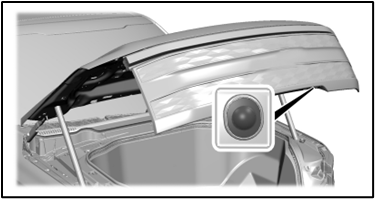 | ||
| Double-pull the hood latch inside the footwell. | 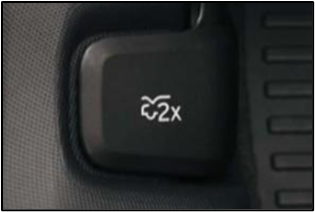 | ||
| Press the frunk button on the Ford app by selecting the Controls button on the Vehicle Dashboard. |  | ||
| Press the frunk button on the SYNC®** touchscreen. |
| ||
| Press 7/8 after entering your code on your keyless entry keypad. | 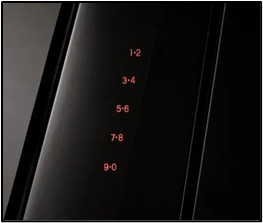 | ||
Press the frunk button twice on your key fob. Note: This method is only available for F-150 Lightning and 2025 model year Mustang Mach-E vehicles. | 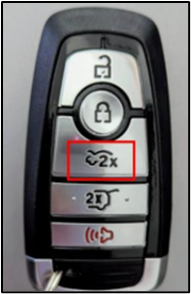 |


Note: If an obstacle is detected when trying to open the frunk, the system will stop and a tone will sound. Once you remove the obstacle, you can continue to operate the frunk.
Closing the Frunk
Refer to the table below for different methods of closing your frunk.
| Closing Method | Example | ||
Manually close the frunk by lowering the hood and applying downward force. Note: For F-150 Lightning vehicles, you can also press the frunk control button on your vehicle. | 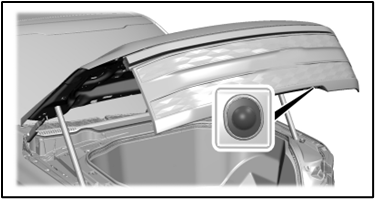 | ||
| Press the frunk button on the Ford app by selecting the Controls button on the Vehicle Dashboard. | | ||
| Press the frunk button on the SYNC®** touchscreen. |
| ||
Press the frunk button twice on your key fob. Note: This method is only available for F-150 Lightning and 2025 model year Mustang Mach-E vehicles. | | ||
| Press the frunk emergency release button if you are stuck inside the frunk. | 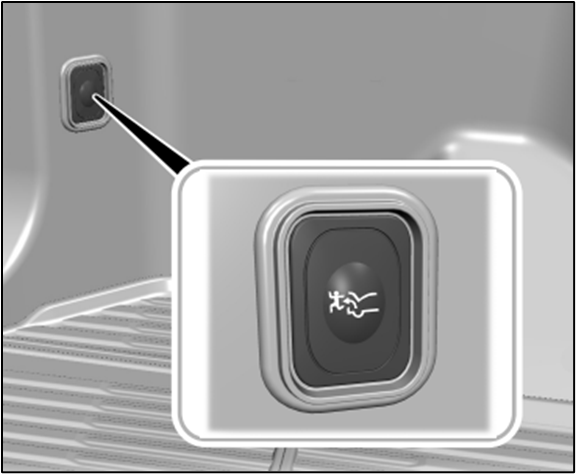 |
Note: If an obstacle is detected when trying to close the frunk, the system will stop and a tone will sound. Once you remove the obstacle, you can continue to operate the frunk.
Adjusting the Frunk Height
Note: The frunk height can only be adjusted for the F-150 Lightning.
- Open the frunk.
- Stop the frunk movement by pressing the frunk control button when it reaches your preferred height.
Note: Once the frunk stops moving, you can manually move it to the preferred height.
- Press and hold the frunk control button until a tone sounds, indicating programming is complete.
Note: You cannot program the height if the frunk position is too low.
The frunk should now open to the programmed height. To change the programmed height, repeat the previous steps.
If you need additional assistance, contact your Ford Dealer to schedule a service appointment.
*Cargo and load capacity are limited by weight and weight distribution.
**Don’t drive while distracted or while using handheld devices. Use voice-operated systems when possible. Some features may be locked out while the vehicle is in gear. Not all features are compatible with all phones.
The Ford app, compatible with select smartphone platforms, is available via a download. Message and data rates may apply.